
Realtor.com Agents | Directory Profiles & Office Phone
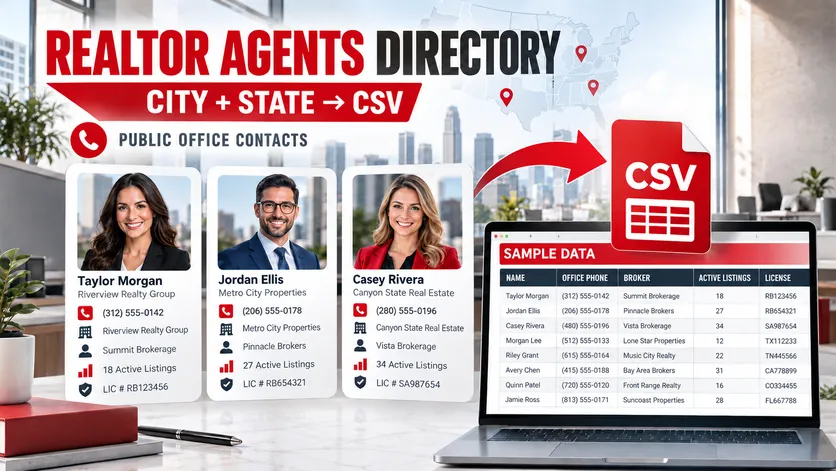
A spreadsheet of public Realtor.com real estate agent directory profiles for the US city and state you name, one row per agent rather than per property listing.
Price and number of rows
What this file is
You get a file with one row per agent, read from the public Realtor.com agent directory for your chosen US city and state or ZIP code.
You can see an agent’s name, office and broker, with published office or agent phone numbers. Ratings and review counts help you compare feedback. For-sale and recently sold counts show listing activity. License details and the Realtor designation add professional context. Profile links, websites and social links help you review agents, and some profiles include public email addresses.
What is inside
Agent and brokerage
You can see each agent’s name, office and broker, along with their license details and Realtor designation.
Reviews and listing activity
You can compare ratings and review counts alongside counts of for-sale and recently sold listings.
Public contacts and links
You get profile links, published phones, websites and social links, plus public emails for some agents, with unlisted numbers left empty.
How to order
- Choose a product and the maximum number of rows you want. Presets are shortcuts, not an order-size limit.
- Say what to collect: the country or city, the search words and the other fields the form asks for.
- Check the source, the requested maximum and the total shown at checkout, then pay with one of the methods shown there.
- We collect the rows, remove empty, failed and duplicate records, and put the file on your order page. An account is optional: you can open the order later with its order number and pickup code.
Most orders arrive within 24–48 hours of payment, and delivery is guaranteed within 72 hours of payment.
What you tell us
When you order, you fill in these fields so we know what to collect:
- US city and state, or ZIP code (Required)
- Agent name
- Realtor members only
Example request: US city and state, or ZIP code: Austin, TX
Sample preview
| name | phone | officeName | brokerName | averageRating | reviewsCount | forSaleCount | recentlySoldCount | isRealtor | licenseNumber |
|---|---|---|---|---|---|---|---|---|---|
| Alex Example | +1-555-0100 | Example Realty | Alex Example | 4.5 | 128 | 87 | 87 | example | example |
| Jordan Sample | +1-555-0100 | Sample Homes | Jordan Sample | 4.5 | 128 | 87 | 87 | example | example |
Ways to use the file
- Sort by recently sold listing count to compare agent activity.
- Filter out empty phone numbers to keep profiles with public contacts.
- Compare ratings and review counts before choosing agents to contact.
Only published contact details are included; unlisted phone numbers stay empty, and some agents have no public email.
Good to know
- Enter a US city with its two-letter state code or a 5-digit ZIP code; a bare city or state is rejected.
- There is no phone-only form filter, so remove profiles without published phone numbers after download.
- Rows describe individual agents, not properties; private numbers are excluded, and the file is not for robocalling or bulk spam.
- You can order 1 to 100,000 rows, with 200, 1,000 and 5,000 as presets.
Questions and answers
What information is in the Realtor.com agents file?
Each row describes one agent, with their office and broker. You can compare ratings, review counts and counts of for-sale and recently sold listings. License details and the Realtor designation describe their professional status. Profile links and published office or agent phone numbers help you reach them. Unlisted numbers stay empty.
How do I order Realtor.com agents for one US city?
Enter the US city and state, for example Austin, TX, and the number of profiles you want. The form takes a US city with its two-letter state code or a 5-digit ZIP code such as 78701, and if you like an agent name. You can tick Realtor members only; to keep only profiles with a phone, filter the phone column in the file.
Which phone numbers does the Realtor.com agents file hold, and does it list properties?
Rows carry each agent's public profile: name, the phone numbers the agent publishes on Realtor.com, website, social links and license number, and for some agents an email; numbers an agent does not publish are not included. The file holds agent directory profiles, not property listings, which are sold as the Realtor listings table. You can order any whole number of rows from 1 to 100,000, with 200, 1,000 and 5,000 as presets.
How can I find the most active Realtor.com agents in Austin?
Order Austin, TX, for example 50 rows, and keep only profiles with a public office phone by filtering the phone column. After download, sort by for-sale or recently sold listing counts to see which agents hold the most listings and sales, and check ratings and review counts before you call. The file is meant for individual professional contact, not robocalling or bulk messages.
When will my Realtor.com agent list be delivered?
Agent profiles for your city are collected from the Realtor.com directory after payment. Most orders arrive within 24–48 hours of paying and all within 72 hours; download the CSV from the order page. If the city yields fewer profiles than the rows you paid for, the amount for the missing rows is credited to your account balance automatically.
Before you pay
We start collecting once your payment is confirmed and send the file to your order page. Most orders arrive within 24–48 hours, and delivery is guaranteed within 72 hours of payment.
If we deliver fewer rows than you paid for, the amount for the missing rows is credited to your account balance automatically. If you buy without an account, the credit is kept with your order until you sign in or create an account; the refund page explains how.